
Mangools SEO Tool: Is it suitable for you and your business?
I’m guessing Google showed you this page because you are searching for tools which you want to use for search engine optimization whether for your business or for your client, well I have good news for you. Google showed you the perfect results. In this page I’m going to be talking about an SEO tool, specifically the 5 SEO tools Mangools has to offer namely KWFinder, SERPChecker, SERPWatcher, LinkMiner and SiteProfiler. Without wasting any more time let’s start:
KWFinder
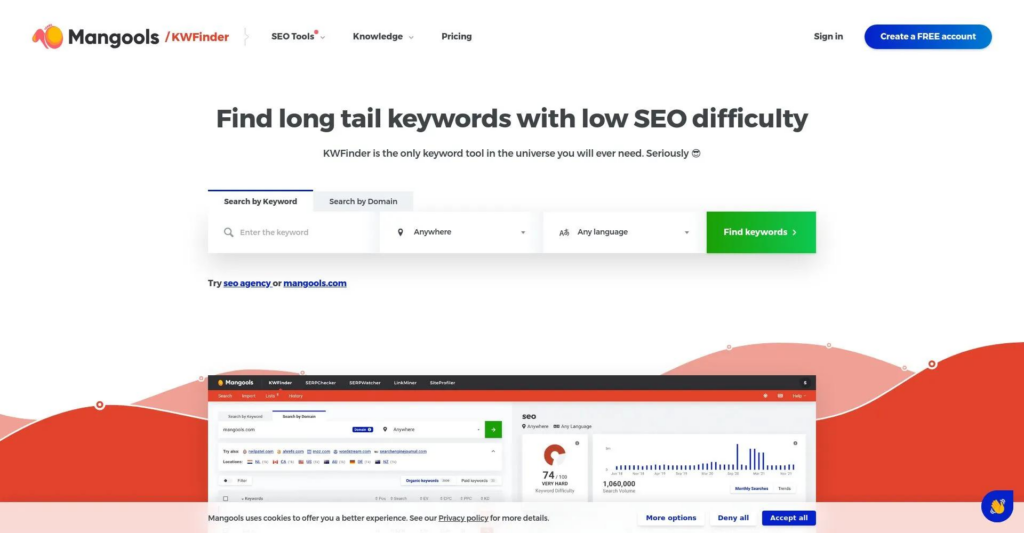
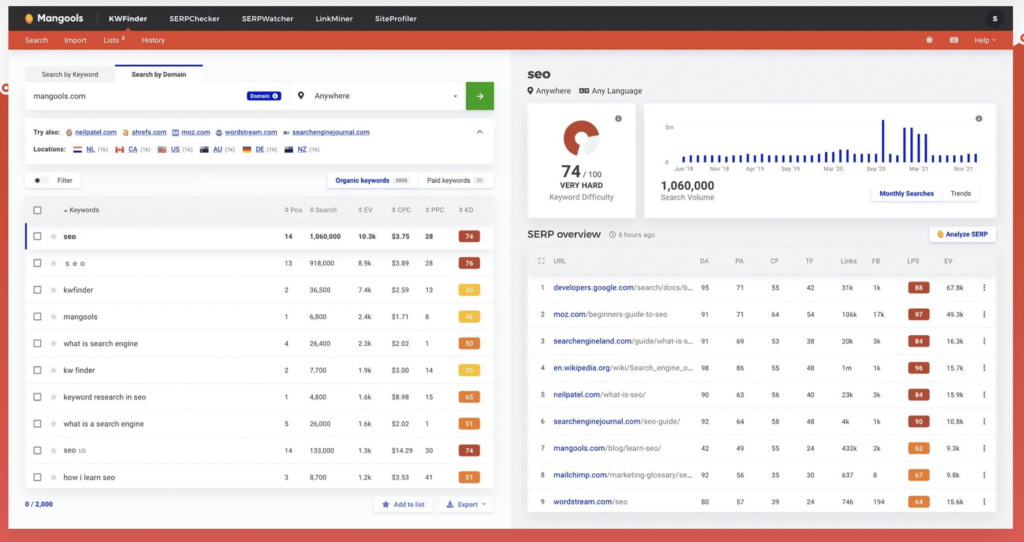
Well this tool does as it’s name suggests, it’s a keyword research tool meaning it helps you find the terms that most people search for with the same intent and shows you pages already ranking for that keyword. See it’s not just a key word generator, it helps you answer what you should you create content about, and which keywords give your website an opportunity to get organic traffic, realistically those tend to be long-tail keywords which answer specific questions and KWFinder excells at doing so. For example you can search a term your website is selling T-shirts, you can type the broad keyword which is T-shirts and KWFinder is gonna generate ideas for it
- Marvel T-shirts for kids
- Plus-sized T-shirts
- Working out T-shirts
- Plain white T-shirts
This is just an example but the point is KWFinder can provide content ideas out of broad search terms based on what people usually search for along that broad term. Mangools themselves say their keyword suggestions come from 3 sources, related keywords, Google Auto complete and just people’s questions .
.KWFinder provides average monthly search volume, along with historical trend information. This is useful because you don’t want to spend days creating a page targeting a phrase that virtually nobody searches for.
It also gives keywords a Keyword Difficulty score from 0–100. This provides an indication of how difficult it may be to rank for a keyword. Lower scores generally indicate less competition.
It can specify locations when researching keywords, which is very useful for businesses targeting searches in specific cities, regions or countries.
Now let’s talk about it’s pros and cons.
Pros:
- KWFinder to makes keyword research very easy to understand even for beginners.
- The 0–100 difficulty score makes it easy to quickly compare keywords.
- Useful for finding more specific keyword opportunities.
- Being able to research keywords through a competitor’s domain is valuable for content planning.
- Useful for businesses targeting specific geographic areas.
- You can save and organize keywords rather than starting your research from scratch every time.
- Trends provide more context than looking at a single search-volume number.
- If someone already uses Mangools, KWFinder works as the keyword-research component of the broader platform.
Cons:
- It’s not the most advanced keyword research tool larger SEO platforms can provide substantially more keyword data and deeper analysis.
- Heavy users may find the limits restrictive compared with tools designed for large-scale SEO research.
- A low difficulty score doesn’t mean you’ll automatically rank. You still need to consider the actual search results, content quality, relevance and your website’s authority.
- Someone running a large SEO operation may eventually want more sophisticated data and analysis.
- If you’re researching enormous keyword sets, a more powerful enterprise-oriented platform may be preferable.
So who is it for, it is for freelancers and small businesses who want to take their keyword research to the next
SERPChecker
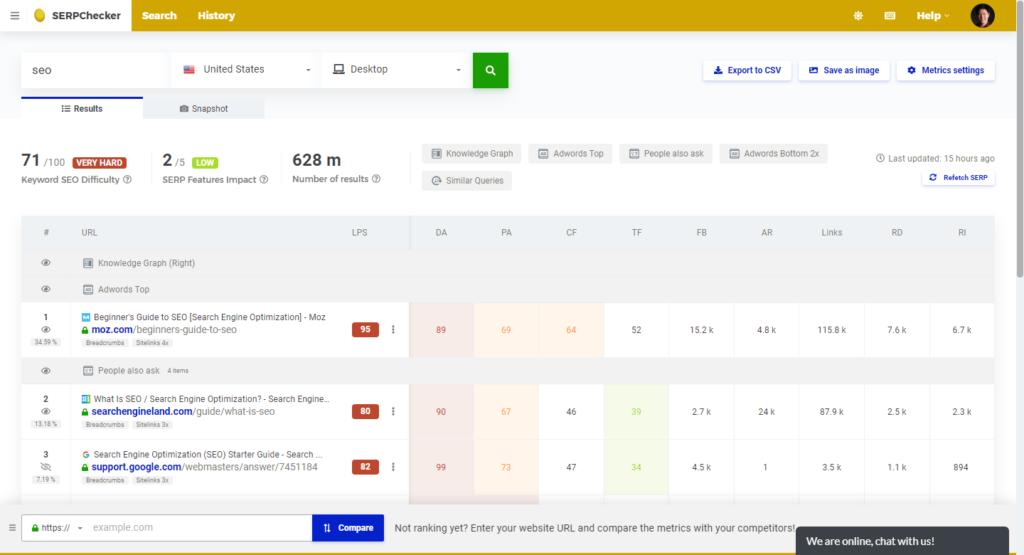
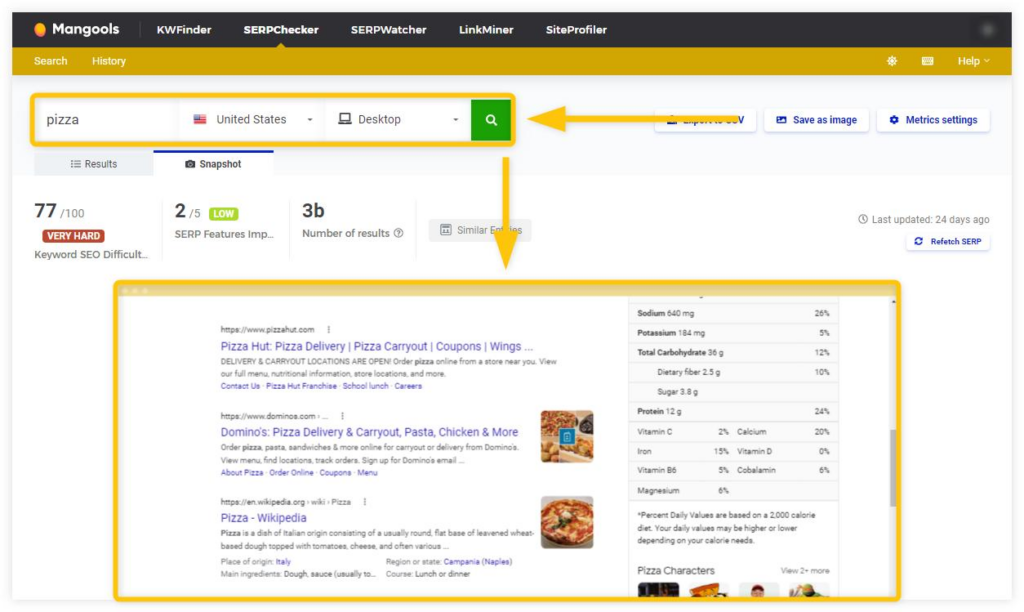
The above images are a demo of SERPChecker, you see this tool is a Mangools Search Engine Results Page analysis tool. What it does is, let’s say for example you wanted to rank for a specific keyword, you would first search that keyword on Google and you would see the SERP. You would see the other pages ranking for that keyword, what it does is give you insight on those Pages like how much authority that Page has, it’s strengths and it’s weaknesses, you could get insight on how you could rank higher by taking all those Pages strengths and none of their weaknesses.
It let’s you know the domain authority of the websites those pages belong to, you may have been thinking of ranking for that specific keyword but then find on the SERPS it’s ranked by websites with high domain authorities compared to yours and you might not try to rank for it and save yourself the waste of time.
This tool helps you know a lot about your competition not just their domain authority and page authority but link profile strength, backlinks, citation flow, trust flow, referring domains as well and other metrics you might find if you choose to use Mangools.
You can also filter for local search results, yep you don’t have to see results of all pages written anywhere and for anywhere in the world. You can just specify that you want to see local search results and that’s useful for businesses who are trying to optimize SEO for a specific region or city.
It has a snapshot feature that lets you see a visual representation of the search results, that’s useful because looking at a list of metrics doesn’t necessarily tell you how crowded or visually competitive the actual Google results page is. It also has a comparison feature that lets you enter your own URL and compare its selected metrics with pages ranking for the keyword. You can see how your page fares against competitors
SERPChecker’s Pros and Cons.
Pros:
- You can see who’s actually ranking rather than just looking at a keyword score.
- Gives you plenty of information for comparing competing pages.
- Helps you determine whether the existing results match the type of content you want to create.
- Useful for local SEO and location-specific research.
- Lets you examine different search environments.
- Helps you see things that could affect organic clicks.
- Makes it easier to understand what the search results actually look like.
- Lets you benchmark your own website against ranking competitors.
- SERPChecker presents information in an accessible way rather than requiring you to be an SEO expert to understand what you’re looking at.
Cons:
- It can be a little overwhelming for beginners, 45+ metrics sounds impressive, but a new SEO user may not know which ones actually matter.
- It has too many metrics some of which may not be that useful having lots of data doesn’t necessarily mean you need to pay attention to all of it.
- Metrics such as Domain Authority and Trust Flow are useful indicators, but Google doesn’t use those specific scores as its ranking factors.
- Google’s results constantly change, so an analysis represents the SERP at the time you’re examining it rather than a permanent picture.
- Mangools plans have limits on keyword and SERP lookups, so heavy users may need a higher plan.
- It tells you a lot about the competition and SERP, but it doesn’t magically tell you exactly what content will rank.
Overall SERPChecker is a good tool as long as you’re not running a giant enterprise, it does have it’s limits but if you’re a freelancer, a beginner or own a small business then it’s the tool for you.
SERPWatcher
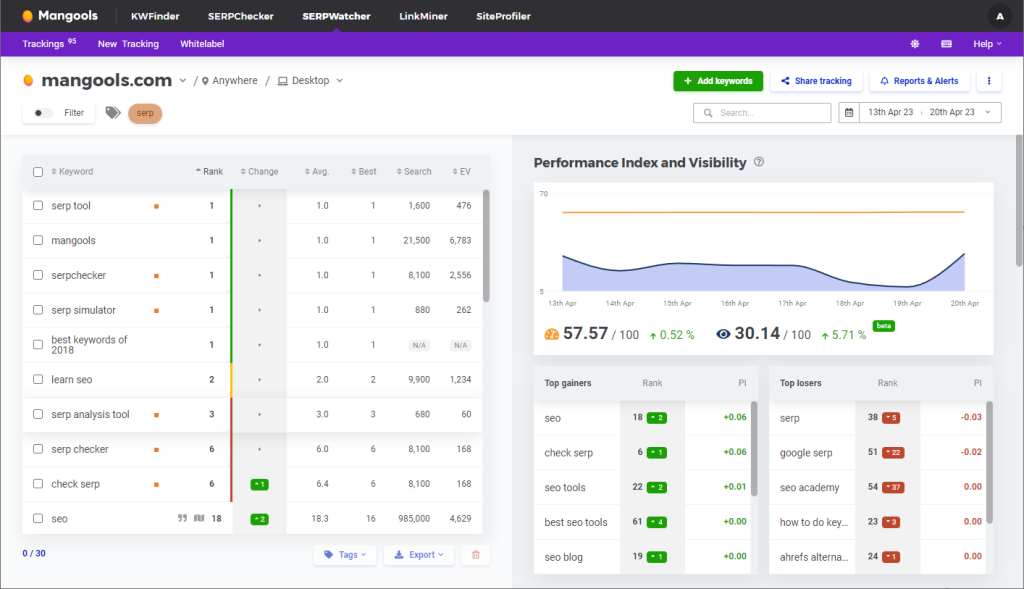
SERPWatcher is a Mangools rank-tracking tool which allows you to monitor where your website’s pages are ranking in Google’s search results. It’s useful because it let’s you answer the question of whether your SEO efforts are actually working and improving rankings on Google or not.
You can take one of your keywords and monitor whether it moved up, down or stayed in the same position, so it gives you the historical record of your rankings rather than just seeing where you rank today. For example you could see that your post went from position 51 to position 36 and is now on position 12.
Again you can track the rankings of a specific location if you are a business which is targeting a specific location. Mangools currently advertises tracking across 65,000+ locations.
SERPWatcher has a perfomance index which can combine every position of every keyword to give you an overall report of whether your rankings are increasing or declining. It can also give you a notification of changes in ranking so you don’t have to open the tool and check everything manually.
It allows you to create reports if you’re working with clients which can be easy to understand and show them the ranking perfomance.
Pros and Cons of SERPWatcher.
Pros:
- It’s interface presents ranking information in a straightforward way, making it accessible to you who isn’t an advanced SEO user.
- You can monitor whether your keywords are moving up, down, or staying relatively stable instead of checking rankings manually.
- You can track rankings for specific locations, which is useful when your SEO targets particular countries, cities, or regions.
- You can monitor rankings across different devices, giving you a broader picture of your search visibility.
- It provides an overall metric that helps you quickly assess how your tracked keywords are performing rather than having to examine every keyword individually.
Cons:
- It isn’t designed to be a complete SEO research platform by itself.
- Larger websites or agencies tracking thousands of keywords may need a higher plan.
- You shouldn’t confuse it with actual website traffic or Google Search Console data.
- Enterprise users may want more advanced rank-tracking and reporting capabilities.
LinkMiner
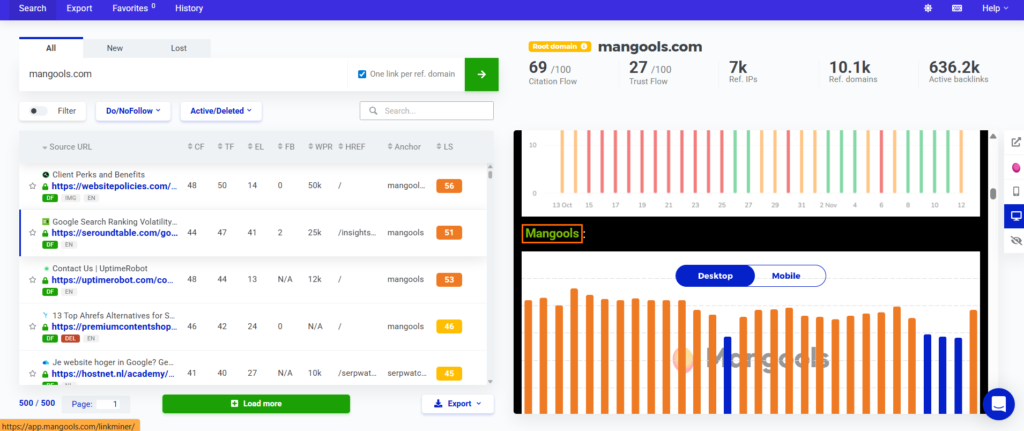
LinkMiner is a Mangools back link analysis tool which can help you to discover and evaluate backlinks pointing to websites. A person can use it to look at your competitor’s backlinks, where they’re getting them from and which of them might be worth pursuing.
You can enter a competitor’s domain or URL and see the backlinks pointing to it and provides a link strength metric that lets you assess the potential of all those backlinks individually instead of having to examine every backlink manually.
This SEO tool has a feature that can allow you to examine information such as Citation Flow, Trust Flow, referring domains, external links and other metrics to help evaluate the quality and potential usefulness of a backlink. You can separate backlinks into All, New and Lost, allowing you to discover recently found links as well as links that competitors have lost which you might be interested in pursuing.
You can narrow the results based on different backlink attributes and metrics, making it easier to concentrate on links that are more relevant to your research. For example backlinks which have to do with only the keywords you’re interested in.
It allows you to add backlinks to a Favorites list so you can return to potential link-building opportunities later instead of having to find them again. It also allows you to export backlink data so if you want to you can do backlink research outside the tool.
Pros and Cons of LinkMiner.
Pros:
- Instead of manually searching for every website that links to a competitor, LinkMiner brings those backlinks together so you can examine potential opportunities in one place.
- The Link Strength metric gives you a quick way to identify potentially powerful backlinks without having to interpret every individual metric before deciding which links deserve your attention.
- Seeing the actual webpage and having the backlink highlighted makes it easier to understand why a competitor received the link and whether it could realistically be replicated.
- Being able to look specifically at new or lost links can uncover opportunities that you might miss if you only looked at a competitor’s current backlink profile.
- LinkMiner focuses on identifying potentially useful backlinks rather than simply presenting an enormous amount of backlink data with no obvious starting point. Mangools specifically positions it as an easy-to-use backlink checker.
Cons:
- LinkMiner won’t necessarily discover every backlink that exists on the web which is typical of a SEO tool.
- Metrics such as Citation Flow, Trust Flow and Link Strength are useful for evaluating backlinks, but they aren’t direct Google ranking factors, so they shouldn’t be treated as guarantees that a particular backlink will improve rankings.
- LinkMiner is designed specifically around discovering and evaluating backlinks, so users looking for a complete SEO platform will need more than this tool alone.
- Although filters and Link Strength help narrow the results, websites with enormous backlink profiles can still produce a lot of information to sort through.
- A high-strength backlink isn’t necessarily relevant or realistic for your website. You still need to consider the referring website, its relevance to your topic, and whether you can genuinely earn the link.
SiteProfiler
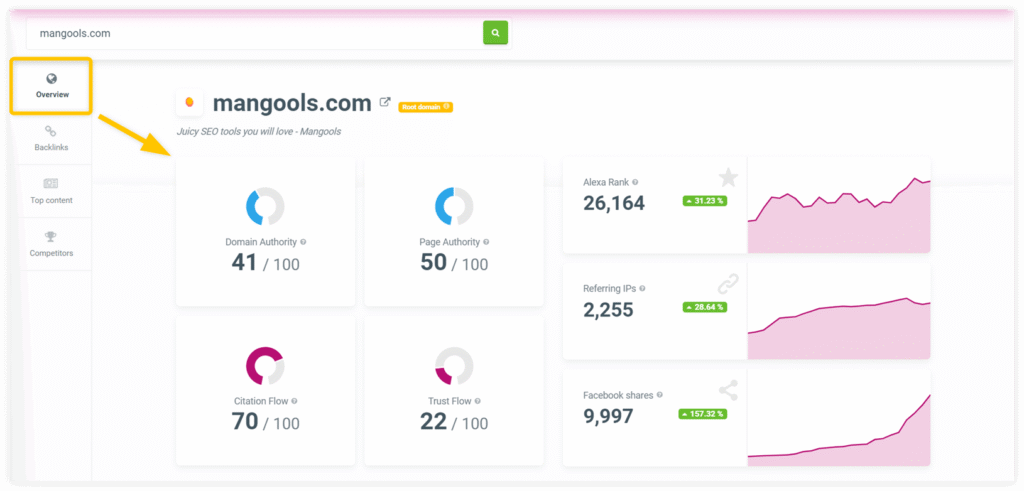
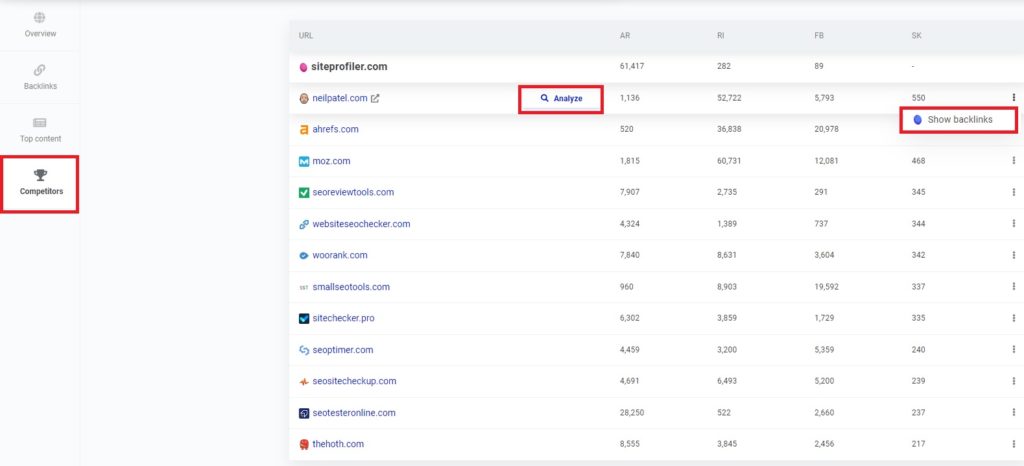
SiteProfiler is a Mangools website and domain analysis tool, it can give you an idea of how a website is performing and how strong it’s SEO profile appears to be.
It gives you an idea of the authority scores of the domain and pages of a website by combining every separate metric so you don’t have to look at every metric separately to know a website’s profile strength.
It can identify content that performs well including pages that attract the most backlinks and pages that rank really well so have high organic traffic. All in all it can be easy to see what type of content your competitor has that attracts visitors.
The tool can also provide demographic and geographic information about a website’s audience thus giving you an idea about what type of audience their content is attracting.
SiteProfiler can give you an idea of whether it is worth competing with a website or websites in the SERPS or not because you might find that the keyword/s you are targeting are ranked for by websites with stronger profiles than yours decreasing your chances of ranking high in the SERPS, so might reconsider trying to rank for those keywords and save yourself the waste of time.
Pros and Cons of SiteProfiler.
Pros:
- SiteProfiler brings several important website metrics together in one place, making it useful when you want to evaluate a domain without performing a lengthy analysis.
- You can enter a competitor’s website and quickly get information about its SEO strength, backlinks, content and competing websites, giving you a useful starting point for competitor research.
- Seeing which pages attract traffic or backlinks can give you ideas about the types of content that are performing well for another website.
- It can reveal websites competing for similar organic keywords, which can help you find competitors that weren’t previously on your radar.
- SiteProfiler is more about giving you a quick overview than throwing an enormous amount of complicated data at you, which makes it approachable for people who are newer to SEO.
Cons:
- SiteProfiler is designed to give you a broad picture of a website rather than performing an extremely deep analysis of every aspect of its SEO.
- Much of the information SiteProfiler provides, such as backlink and authority data, can also be found in more specialized SEO tools, so advanced users may find it less necessary as a standalone tool.
- Metrics such as authority and trust scores can be useful for comparing websites, but they shouldn’t be interpreted as direct Google ranking scores or guarantees of how well a site will rank.
- Traffic figures are estimates rather than the website’s actual analytics data, so they should be treated as an indication rather than an exact visitor count.
- If you need a comprehensive technical audit or extremely detailed competitor investigation, SiteProfiler isn’t intended to replace a dedicated enterprise-level SEO platform.
Final thoughs:
To answer the question of whether or not Mangools SEO tool is suitable for you or not all boils down to who you are. If you are a giant website or entreprise with loads of data then Mangools is not for you, but if you are a small start up business or SEO beginner I have good news for you Mangools is the tool for you and you can click the button below to try it out right now.
If you want more SEO insights you can visit our blog and you can sign up for our newsletter at our contact page for new updates. If you are looking for an SEO course you can click here. Good Luck.